dsh-claude-provider
Đã xác minh@mofeng2223/dsh-claude-provider · v0.5.9 · MIT · Giao diện web
Custom Claude provider support for DeepSeek Harness 0.2.1-alpha.2
Cài đặt
dsh plugin add @mofeng2223/dsh-claude-provider Xác nhận layer đã áp bằng dsh --profile default --dump-config — xem hướng dẫn cài plugin.
Mã nguồn
Thẻ
Tác giả
Readme
DSH Claude Provider
English | 简体中文
DSH Claude Provider 为 DeepSeek Harness 提供专用的 Claude 配置界面。你可以添加多个 Claude 提供方,为每个模型选择推理档位,并自动获取模型列表、填写常用 Claude 模型的容量和推理预设,无需手动编辑配置文件。
相比官方的通用自定义提供方配置,插件增加了独立的 Claude 入口、五档/四档/开关式推理预设,以及按已知 Claude 模型自动填写参数的功能。保存后的推理配置由 DeepSeek Harness 原生处理。
插件功能
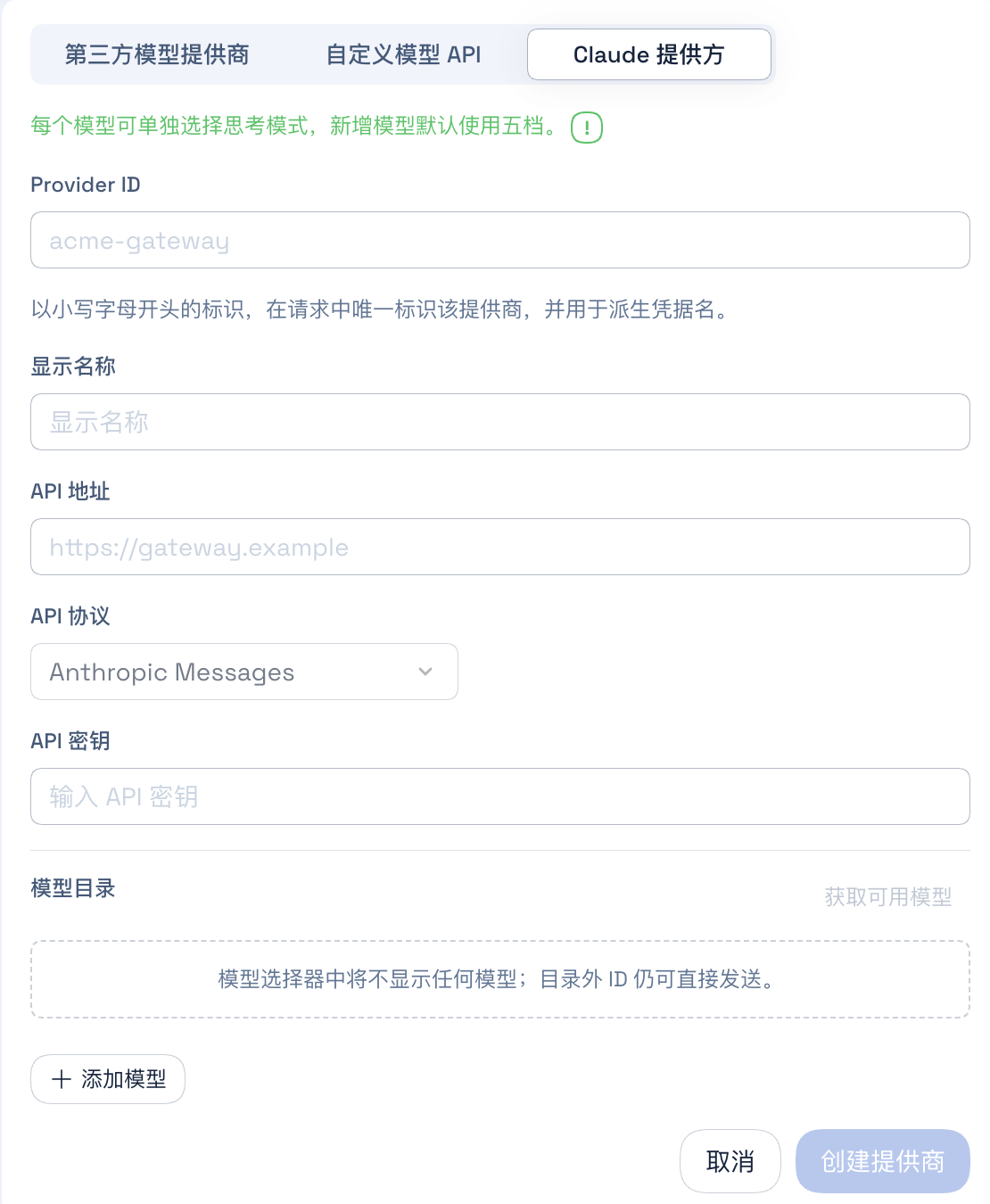
增加独立的 Claude 提供方类型
在「设置 → 模型 → 添加模型提供商」中选择「Claude 提供方」,即可打开专用的 Anthropic Messages 配置表单。
增加按模型设置的推理模式
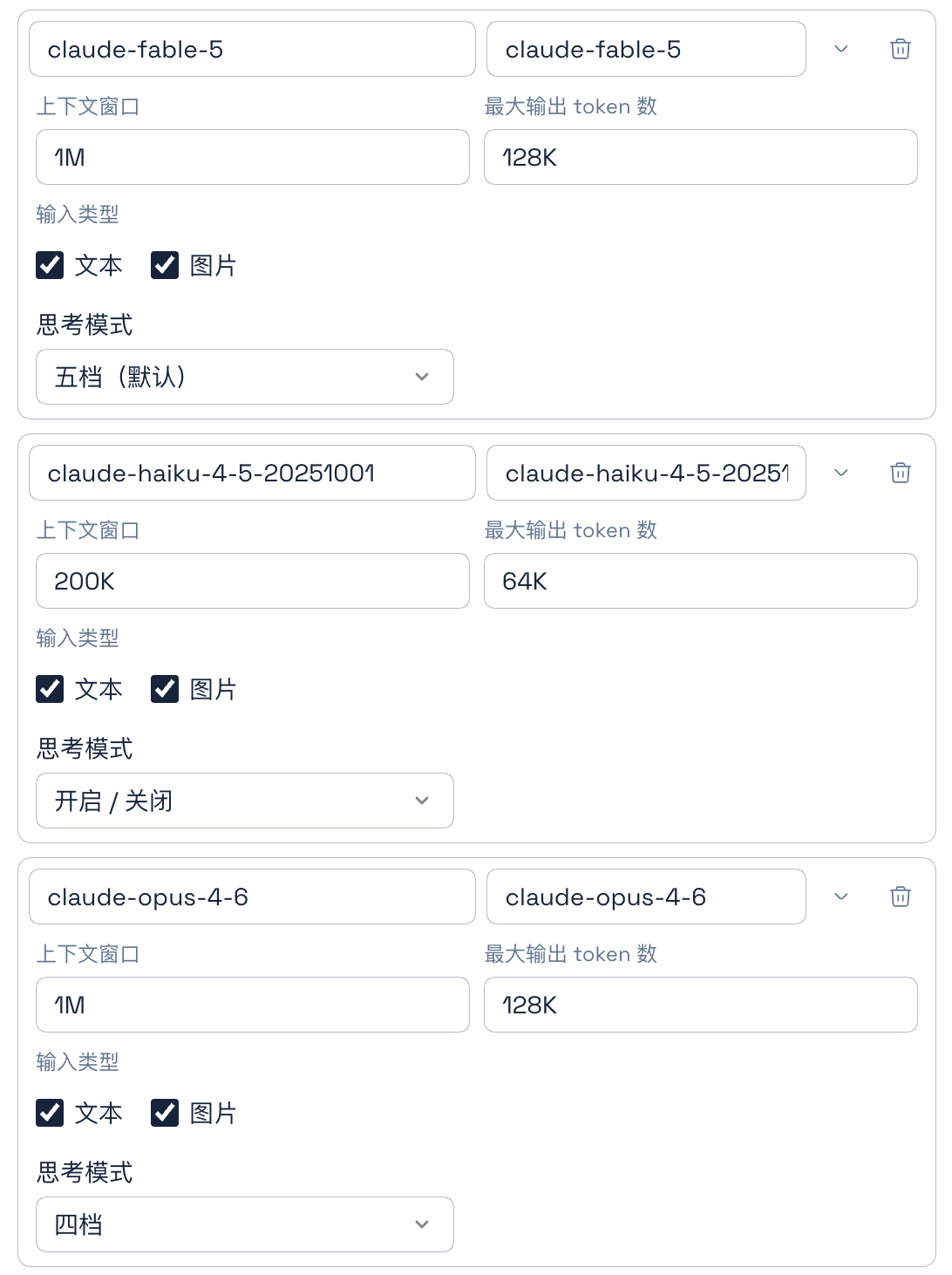
每个模型可以单独选择以下三种档位配置之一:
- 五档:Low、Medium、High、XHigh、Max
- 四档:Low、Medium、High、Max
- 开关:On、Off
新增模型默认使用五档,Claude 提供方默认选择 High。
插件会在保存时将模型的推理档位和自适应思考设置写入 DeepSeek Harness 原生配置。
支持 Anthropic 模型列表分页获取
插件通过 Anthropic 兼容的
GET /v1/models接口获取模型列表,并根据接口返回的游标继续读取后续页面、合并重复模型。探测后自动填写常用 Claude 模型参数
探测到的模型 ID 如果与插件已经记录的 Claude 模型匹配,插件会自动填写上下文窗口、最大输出长度和推理模式。用户手动添加的模型仍然可以自由编辑,不会被这项自动匹配覆盖。
不影响其他提供方
模型探测、参数预填和推理档位配置只对明确创建为“Claude 提供方”的 Provider ID 生效。DeepSeek Harness 的内置提供方和普通自定义提供方会保持原有行为,即使它们同样使用
anthropic-messages协议,或者包含claude-*模型 ID,也不会被插件修改。
安装
安装已发布的版本
浏览器界面使用 Web Profile:
npx @deepseek-ai/dsh plugin --profile web add @mofeng2223/dsh-claude-provider
安装后需要重启对应的 DeepSeek Harness 进程。
从源码安装
先克隆、构建并打包项目:
git clone https://github.com/MoFeng2223/dsh-claude-provider.git
cd dsh-claude-provider
npm install
npm run build
mkdir -p dist
npm pack --pack-destination dist
将生成的包安装到 Web Profile:
npx @deepseek-ai/dsh plugin --profile web add ./dist/mofeng2223-dsh-claude-provider-*.tgz
卸载
npx @deepseek-ai/dsh plugin --profile web remove @mofeng2223/dsh-claude-provider
卸载插件不会删除官方模型配置或已经保存的凭据。已有的 Claude 提供方会继续作为普通的 anthropic-messages 自定义提供方保留,已保存的推理档位和自适应思考配置仍然有效。卸载后将不再提供 Claude 专用的添加/编辑界面、分页模型探测和参数预填;官方的模型探测功能仍然可用。
DSH 0.1.7 升级与配置迁移
本版本适配 DSH 0.1.7-alpha.2。
1. 尚未安装新版 DSH
先关闭 DSH,升级 DSH 和 Claude 插件,再启动 DSH。新版 DSH 首次启动时,会尝试将旧 settings.yaml 迁移到当前 Profile。
2. 已安装新版 DSH,但尚未运行
此时尚未触发配置迁移。先更新 Claude 插件及其他需要适配的插件,再启动 DSH。新版 DSH 首次启动时,会尝试迁移旧 Settings 配置。
3. 已安装并运行过新版 DSH
此时 Settings 已经由 DSH 执行过自动迁移,部分配置可能存在迁移问题。
对本插件而言,可能的影响只有 Claude 提供方类型标记丢失,模型配置和运行不受影响。