dsh-codex
Đã xác minh@syncended/dsh-codex · v0.1.1 · MIT · Giao diện web
OpenAI Codex (ChatGPT Plus/Pro) provider for DeepSeek Harness, with Web UI and CLI device-code OAuth login.
Cài đặt
dsh plugin add @syncended/dsh-codex Xác nhận layer đã áp bằng dsh --profile default --dump-config — xem hướng dẫn cài plugin.
Mã nguồn
Thẻ
Readme
DeepSeek Harness — OpenAI Codex Plugin
Use a ChatGPT Plus or Pro subscription as an LLM provider in DeepSeek Harness.
The plugin adds device-code OAuth login through the Web settings UI and an interactive Harness /codex slash command. It does not run a browser callback server or localhost listener. After login, Codex models appear with other providers, tokens refresh automatically, and Web shows 5-hour and weekly limits in a Codex limits popup.
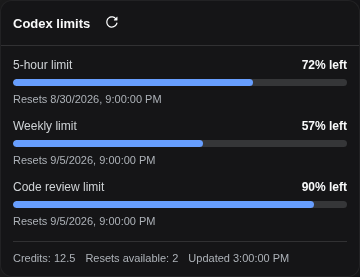
Rendered by the real plugin UI with sanitized demonstration balances.
The limits view and the live model-catalog sync use OpenAI's undocumented Codex endpoints. Their availability and response shape may change without notice.
Requirements
- A ChatGPT Plus or Pro subscription with Codex access.
- DeepSeek Harness
0.1.0-rc.6or a compatible release. - Node.js 18 or newer.
- pnpm available to the
dsh plugincommand. - Outbound HTTPS access to
auth.openai.comandchatgpt.com.
Install
DSH reconciles plugins per profile. Install the package in every profile where the provider or /codex command is needed; web is shown here:
dsh plugin --profile web add -w @syncended/dsh-codex
For local development, install a checkout instead:
dsh plugin --profile web add -w /absolute/path/to/deepseek-harness-openai-codex
The package declares a DSH bundle. It registers the openai-codex route and maps its credential automatically, so no dsh settings set command is needed. Restart the selected profile after installing or upgrading.
To remove it:
dsh plugin --profile web remove @syncended/dsh-codex
Connect a ChatGPT account
Web GUI
- Open Settings → OpenAI Codex.
- Click Sign in. The plugin opens OpenAI's device-login page in another tab.
- Return to DSH, copy the one-time code displayed there, and paste it into the OpenAI page.
- Approve access and return to DSH. The settings page updates to Connected automatically.
- Choose an
openai-codex/...model from the standard model selector and send a test prompt. - Use Codex limits above Settings to inspect the normalized 5-hour and weekly balances.
Like other DSH credential settings, Web login is restricted to a loopback/same-origin Host session. For a remote Host, use an authenticated SSH/local tunnel to its loopback Web UI rather than exposing credential operations publicly.
Interactive Harness command
/codex is a Harness slash command, not a shell executable. Run it inside an interactive profile that has this plugin installed:
| Command | Description |
|---|---|
/codex login |
Start the device-code flow and print the verification URL and code. |
/codex status |
Show token status and expiry. |
/codex models |
Re-read OpenAI's Codex model catalog and republish it to the model selector. |
/codex logout |
Delete the stored token file and unpublish the live credential. |
How it works
- The plugin stores
{ access, refresh, expires }in$DSH_HOME/openai-codex.jsonby default. - It publishes only the live access token to the DSH credential service as
OPENAI_CODEX_TOKEN. - The bundled
llm-pi-airoute uses theopenai-codex-responsesAPI and serves the installed pi-ai Codex catalog directly. It declares nomodelslist: indsh-llm-pi-aia configured list replaces the catalog rather than extending it, so a hard-coded list would freeze model availability at this package's release. - The plugin then mirrors OpenAI's own Codex model catalog into the
llm-pi-aisettings section, because the installed pi-ai catalog is a snapshot that lags what ChatGPT actually serves. Every model OpenAI still offers appears — including models it marks with anupgradesuccessor, which remain usable until OpenAI retires them — while rows the catalog hides or excludes from the API are dropped. The sync runs at startup, after login, on/codex models, and everymodelCatalogRefreshMs. - The refresh loop renews credentials shortly before expiry without requiring a Host restart.
- The Web limits API calls OpenAI from the Host and returns only normalized percentages, reset times, and optional credit balances; OAuth tokens never cross into browser JavaScript.
Protect $DSH_HOME: the token file is sensitive local credential state. /codex logout removes it and clears the published credential.
Configuration
The defaults normally need no changes. To override them, edit the existing openai-codex row in $DSH_HOME/profiles/<profile>/cordis.patch.yml and restart that profile:
- id: openai-codex
  config:
    # clientId: app_EMoamEEZ…hrann
    credentialRef: OPENAI_CODEX_TOKEN
    deviceCodeTimeoutSeconds: 900
    refreshWindowMs: 300000
    modelCatalogRefreshMs: 21600000
    # modelCatalogExclude:
    #   - gpt-5.5
    # dshHome: /absolute/path/to/dsh-home
    # tokenFile: /absolute/private/path/openai-codex.json
| Key | Default | Description |
|---|---|---|
clientId |
built in | OpenAI OAuth client ID used by the device flow. |
credentialRef |
OPENAI_CODEX_TOKEN |
DSH credential ref receiving the live access token. |
deviceCodeTimeoutSeconds |
900 |
Maximum time to approve a device login. |
refreshWindowMs |
300000 |
Refresh-loop scheduling window; the implementation still refreshes only near expiry. |
modelCatalogRefreshMs |
21600000 |
Interval between Codex model-catalog syncs (6 hours). |
modelCatalogExclude |
[] |
Optional ids to hide even though the catalog still offers them. Empty by default: every available model is published. |
dshHome |
normal DSH home | Alternate base directory used to derive the default token path. |
tokenFile |
$DSH_HOME/openai-codex.json |
Absolute token persistence path; takes precedence over dshHome. |
Token-path precedence is tokenFile, then dshHome, then DSH_HOME, then ~/.dsh.
Model list
Two sources feed the selector, in this order:
- The bundle declares no
modelslist, so the route serves the whole Codex catalog installed withpi-ai. - The plugin overwrites
modelsin thellm-pi-aisettings section with the live list from OpenAI's own Codex model catalog (/backend-api/codex/models). This is what makes models appear thatpi-aihas not shipped yet. The write lands in$DSH_HOME/settings.yaml, so the last synced list survives a Host restart and a temporarily unreachable backend.
A models list replaces the catalog instead of extending it, which is why the plugin writes the complete live list rather than individual entries. To pin a subset by hand, edit the openai-codex provider in settings.yaml; the next scheduled sync will overwrite it again, so set modelCatalogRefreshMs to a large value if a manual list must stand.
llm-pi-ai:
  providers:
    openai-codex:
      models:
        - id: gpt-6-astra
        - id: gpt-6-sol
        - id: gpt-6-luna
The sync publishes every model the catalog marks as available:
- rows the catalog hides (
visibility: hide) or excludes from the API (supported_in_api: false) are dropped —gpt-reserve,codex-auto-revieware internal and never usable; - everything else is published, including models the catalog carries an
upgradehint for (gpt-5.6-sol,gpt-5.6-terra,gpt-5.6-luna,gpt-5.5). Anupgradeis a migration suggestion, not a retirement: OpenAI keeps those models servable, so they stay selectable; modelCatalogExcludeis the only way to hide an available model, and it is empty by default.
Models the catalog describes keep their context window, token cap, modalities, and reasoning levels; a synced entry overrides only the fields it sets. Reasoning levels the harness does not know (for example ultra) are dropped rather than mistranslated.
Models that pi-ai does not describe (for example gpt-6-sol) are declared without the catalog's compat flags, because dsh-llm-pi-ai only offers those to catalog rows. Basic requests work; the optional grammar-tool and tool-search switches stay off until pi-ai ships the model.
If credentialRef is changed, update the matching provider mapping in the existing llm-pi-ai row as well; otherwise the route continues reading OPENAI_CODEX_TOKEN:
- id: llm-pi-ai
  config:
    providers:
      openai-codex:
        displayName: OpenAI Codex
        apiKeyEnv: MY_CODEX_TOKEN_REF
Troubleshooting
- No Codex models: confirm the plugin is installed in the active profile, restart that profile, and verify
/codex statusreports a credential. If only some Codex models show, a hand-pinnedmodelslist is shadowing the synced one. - A new Codex model is missing: run
/codex modelsto re-read OpenAI's catalog, then check the Host log if the sync failed. A model whoseminimal_client_versionis newer than the plugin'sCODEX_CLIENT_VERSIONstays hidden until the plugin is updated. - A model disappeared after a sync: only models the catalog hides or drops from the API disappear on their own, plus any id in
modelCatalogExclude. Clear the exclude list or pin a manualmodelslist to keep one. - Login never completes: confirm outbound access to OpenAI endpoints, repeat
/codex login, and approve before the 15-minute timeout. - Remote Web login is rejected: connect through loopback using an authenticated tunnel; credential mutation is intentionally restricted.
- Limits fail but models work: the undocumented usage endpoint may have changed or be unavailable; model requests use a separate API path.
- Model catalog sync fails:
/backend-api/codex/modelsis undocumented and may change; the last synced list stays in$DSH_HOME/settings.yaml, so the selector keeps working until a later sync succeeds. - Repeated sign-in after configuration changes: verify the token path is writable and
credentialRefmatches thellm-pi-aiprovider mapping.
Development
npm test
npm pack --dry-run
Tag-driven publication is documented in RELEASING.md.
License
MIT — see LICENSE.